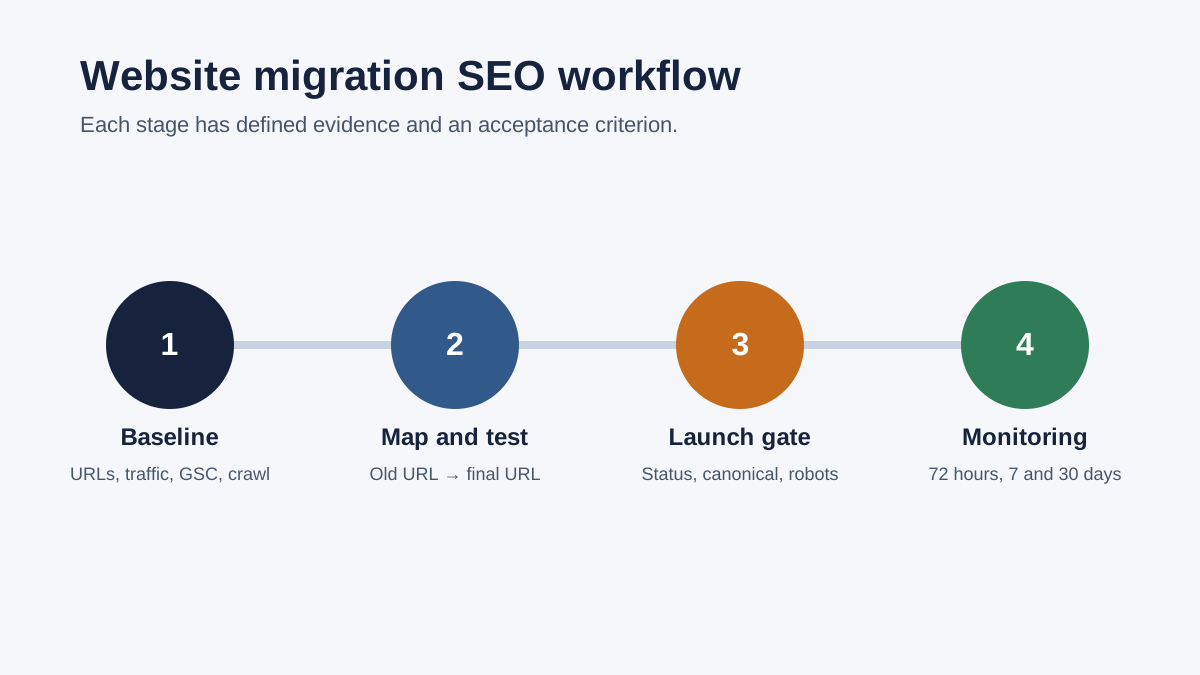
A tested old URL → final new URL map is the foundation of an SEO migration. Capture the current baseline before launch. Collect every valuable URL, assign the closest relevant destination, and test status codes, canonical tags, internal links and indexability. Monitor both the old and new site after release. Some short-term ranking movement can occur, but redirect chains, widespread 404s and blocked indexing still require immediate action.

1. Define exactly what will change
From an SEO perspective, a migration is any change that requires search engines to reassess URLs, site versions or content. Common examples include:
- moving to a new domain or subdomain;
- switching from HTTP to HTTPS;
- consolidating www and non-www versions;
- changing URL paths or directory structure;
- moving to a new CMS, e-commerce platform or server;
- redesigning templates while also changing content, navigation or internal links;
- merging several sites or language versions.
Multiple simultaneous changes make a decline harder to diagnose. Google recommends splitting major changes into stages where practical. A domain move and a complete redesign with rewritten content are easier to evaluate when they happen separately, provided the business timeline permits it.
Acceptance criterion: the project brief contains one sentence that states whether the domain, protocol, URLs, platform, content and design will change. An omitted change is an untested change.
2. Capture the baseline before migration
A baseline separates the effect of the migration from faults that existed before it. A single total for organic traffic is too broad. Keep URL-level and query-level evidence.
Collect old URLs from several sources
- XML sitemaps and a current crawl of the website;
- CMS or database exports;
- Google Search Console page and link data;
- organic landing pages from analytics;
- server logs, when available;
- reports of important external links;
- destinations used by paid campaigns, email and other channels;
- images, PDFs and other indexable files whose addresses will change.
An XML sitemap can omit older, orphaned or accidentally excluded URLs. A crawl also has limits because it cannot discover a page that no longer receives any internal link. Combine sources and retain where each URL was found.
Record the measurement baseline
- 3–16 months of Search Console clicks, impressions, queries and pages, with seasonality in mind;
- organic landing pages and conversions from analytics;
- status codes, titles, H1s, canonical tags, robots directives and index state for priority URLs;
- screenshots and content extracts for important templates;
- the current navigation, internal links, hreflang and structured data.
A technical SEO audit can expose conflicting crawl and indexing signals before the move. Use a broader SEO audit when the project also changes information architecture, content and the priority of commercial pages.
3. Assign an outcome to every old URL
A redirect map is an operating document. Alongside old and new URLs, record the source, organic value, decision, intended status, canonical target, internal-link and sitemap updates, owner, and test result.
301 redirect mapping template
A 150-row working sheet with dropdowns, an automatic status formula, example decisions and checks for before and after launch.
When to use 301, 308, 404, 410 or keep the URL
| Decision | Use it when | What to verify |
|---|---|---|
| 301 | The old address has moved permanently to a new page with matching purpose and content. | One direct hop, a correct final 200 URL, and updated internal links. |
| 308 | The move is permanent and the HTTP method must be retained. A 301 is usually used for ordinary GET pages. | Test server and client behaviour, especially for forms and APIs. |
| 404 | The page has gone and no meaningful replacement exists. | Remove internal links and provide a useful error page. |
| 410 | The resource was deliberately and permanently removed. | Confirm that removal is final and that no relevant replacement exists. |
| Keep | The URL will remain unchanged or must stay available at the same address. | A 200 response, self-referencing canonical, and retained content and metadata. |
A deleted page should not automatically redirect to the homepage. When the destination fails to satisfy the old page's purpose, Google may treat the redirect as a soft 404. A many-to-one redirect can be appropriate when several old pages have genuinely been consolidated into one stronger resource. Record the reason for that consolidation in the map.
Redirect-map quality rules
- Each old URL redirects directly to its final destination, without an intermediate address.
- The destination matches the topic and search intent, rather than merely belonging to the same broad category.
- The rules contain no loops such as A→B→A or long chains such as A→B→C→D.
- The new URL returns 200 and is not blocked by robots.txt or a noindex directive.
- The new URL has a self-referencing canonical when it is the preferred version.
- Internal links, hreflang, structured data and the XML sitemap point to the final URL.
- Parameter, case, trailing-slash and file variants are tested separately.
4. Test the new site before launch
A staging site may be password-protected or carry a noindex directive. The launch plan must include a named step to remove that protection. A copied staging noindex tag or restrictive robots.txt file can prevent the new production site from being indexed.
- Crawl the staging site and compare the count of important pages with the approved scope.
- Confirm that every priority URL provides useful HTML, a title, one H1 and a relevant meta description.
- Test navigation, breadcrumbs and contextual internal links.
- Check canonical and hreflang tags for absolute production URLs, not staging-domain references.
- Test forms, cart, sign-in and analytics workflows.
- Validate structured data against the visible page content.
- Ensure the new XML sitemap contains only indexable, canonical URLs that return 200.
- Run the redirect rules in a copy or separate environment and compare the responses with the approved map.
The technical SEO audit checklist gives these checks an evidence, owner and acceptance-test structure. The interactive audit example shows how First Glance records observed issues and ordered actions.
Launch gate: the migration is not ready while priority rows lack a final decision, critical templates remain untested, or nobody is responsible for restoring the previous version after a serious failure.
5. Launch-day checklist
- Freeze unplanned content changes. A short change window makes the before-and-after comparison easier to interpret.
- Deploy the site and redirects within the same window. Avoid a gap in which old URLs fail before the rules are active.
- Remove staging restrictions. Recheck robots.txt, meta robots, X-Robots-Tag headers and sign-in protection.
- Crawl priority URLs. Test the old address, each intermediate response, the final address, its status and its content.
- Update internal signals. Navigation, canonicals, hreflang, structured data and the XML sitemap must reference the new URLs.
- Submit the new sitemap in Search Console. Submission helps discovery but does not guarantee indexing.
- Use Change of Address only for a supported move. The tool applies to domain or subdomain moves. It does not apply to HTTP→HTTPS changes, www consolidation or path changes within one domain.
- Test analytics and conversions. A migration has failed commercially if people reach the pages but cannot complete the intended action.
Submitting hundreds of individual indexing requests will not force inclusion. Google states that an indexing request and an XML sitemap do not guarantee inclusion. Fix conflicting technical signals and provide crawlable internal links before submitting affected URLs.
6. Monitor the first 72 hours, 7 days and 30 days
| Period | What to check | When to escalate |
|---|---|---|
| 0–72 hours | Server errors, robots/noindex, priority URL statuses, canonicals, forms, analytics and redirect loops. | Immediately when important URLs return 5xx, widespread 404s, an unintended noindex or the wrong destination. |
| Days 1–7 | Search Console URL Inspection, Page Indexing trends, sitemap processing and Googlebot activity in server logs. | When new URLs are not discovered, or Google systematically selects an old or different canonical. |
| Days 8–30 | Changes in queries, pages, impressions, clicks and conversions against an appropriate comparable period. | When a decline is concentrated in a valuable template, query group or landing page and has no verified explanation. |
Google recommends keeping redirects in place for at least one year so signals can transfer to the new URLs. Leaving them active longer often helps users, especially when old links still receive visits. The appearance of new URLs in the index is not a reason to remove working redirects.
If the migrated site does not appear in Google, follow the indexing and ranking diagnostic guide. It separates a URL that is absent from the index from one that is indexed but receives no impressions for the target query.
7. Three verifiable redirect examples
Example A: a direct move
Old: https://example.com/services/seo-audit
New: https://example.com/seo-audit
Decision: 301 directly to the new URL. The destination returns 200, has a self-referencing canonical, and every internal link uses the new address.
Evidence: one redirect hop and a destination with the same purpose.
Example B: an avoidable chain
Incorrect: /seo-audit → /services/seo → https://www.example.com/seo-audit/ → final 200.
Correction: every known old variant redirects directly to the final preferred URL.
Evidence: the retest finds no intermediate 3xx response and no internal link to an old variant.
Example C: no suitable replacement
Old: /promotion-2021
Fact: the promotion ended and no equivalent offer exists.
Decision: return 404 or 410 rather than redirecting to the homepage. Remove internal links and the sitemap entry.
Evidence: visitors are not sent to an unrelated destination.
These addresses are synthetic demonstrations. They are not presented as client results.
8. Assign owners and define rollback conditions
Every critical migration check needs a named owner and deadline. “The developers will check it” cannot be tested. Record the accountable person, the evidence required and who has authority to stop the launch.
| Responsibility | Typical owner | Verifiable output |
|---|---|---|
| URL inventory and priorities | SEO specialist and content owner | Every valuable old URL has a decision, priority and relevant destination. |
| Redirect rules | Developer or infrastructure team | An automated retest matches the approved map and finds no loops or chains. |
| Content and metadata parity | Content and SEO team | Priority URLs retain important copy, titles, H1s, structured data and conversion elements. |
| Analytics and conversions | Analytics or marketing owner | A real test action appears once in the correct analytics property. |
| Launch decision | One named project lead | A completed go/no-go checklist records the remaining risks. |
Conditions that should stop the launch
Some warnings can wait. Stop the launch when priority redirects are missing, a site-wide noindex remains in production, robots.txt blocks core templates, critical pages return 5xx, the order or enquiry form fails, or the previous version cannot be restored reliably. A minor meta-description mismatch can be corrected after launch. Loss of access to the site cannot.
Write the rollback plan before release
Define the technical conditions that trigger rollback, the person who decides, how long the previous version will remain recoverable, and how new data collected after launch will be retained. Ranking movement alone should not trigger an automatic rollback. Switching back and forth after new URLs have been distributed creates further contradictions.
How to investigate a post-migration decline
- Segment the decline by directory, template, query group, country and device.
- Identify whether impressions, average position, click-through rate or conversions changed. Each signal requires a different investigation.
- Compare specific old and new URLs with the approved map instead of relying on one domain-level chart.
- Use server logs and Search Console to verify discovery and crawling of new URLs and continued access to old redirects.
- Look for a repeated mechanism: a wrong canonical template, missing content, changed navigation, faulty hreflang or one redirect rule.
This segmentation turns “traffic fell” into a testable hypothesis. Stable branded queries alongside lower category-page impressions point the investigation towards category URLs, content parity and internal links.
Close the project only after critical map rows pass post-launch testing, the new sitemap contains no redirecting URLs, primary internal links point directly to final destinations, and the monitoring period has an owner. Preserve the final URL map, crawl report, known-exception list and the earliest date when redirects may be reviewed for removal. This record makes later server and CMS changes safer.
9. Primary sources and fact check
- Google Search Central: Site moves and migrations
- Google Search Central: Redirects and Google Search
- Google Search Central: Ask Google to recrawl your URLs
- Google Search Central: Troubleshoot crawling errors
- RFC 9110: 3xx redirection semantics
Sources checked on 25 October 2026. This guide does not promise stable rankings during a migration. It is designed to reduce avoidable faults and make the outcome measurable.
Browse all SEO guides and resources
Review the migration before launch or after a decline
A technical SEO audit can verify redirects, indexation signals, canonical tags, sitemap entries and status codes. Choose the broader SEO audit when the migration also changes content, architecture and commercial priorities.
Discuss your migration