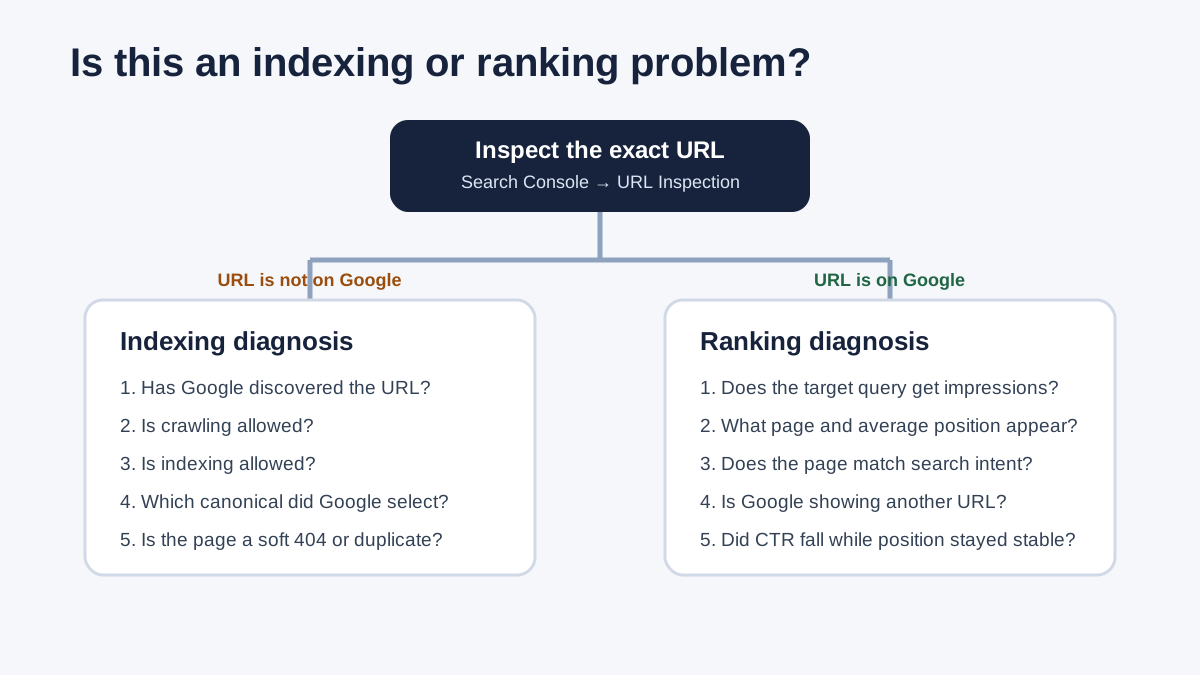
A website that does not appear in Google needs an indexing check first. If the exact URL is absent from Google's index, investigate discovery, crawl access, indexing permission, canonical selection and content. If the URL is indexed but missing for a target query, investigate how Google serves and ranks it. Check demand, search intent, country, language, competition and possible site-wide restrictions. Search Console's URL Inspection tool answers the first question. Its Performance report helps investigate the second.

1. Define exactly what is missing
Write down one testable symptom before opening tools. “My website is not on Google” could describe several different situations:
- a specific URL is not indexed;
- the whole domain is missing, even for a branded search;
- an indexed page has no impressions for its target query;
- a previously visible page has lost impressions or position;
- Google shows the wrong URL or language version;
- impressions and position are stable, but clicks have fallen;
- a new page has not yet been discovered or crawled.
A manual search is a useful observation, but it cannot establish index coverage. Results vary with location, language, device, query and time. The site: operator provides a quick overview rather than a complete index inventory. Use Search Console data and the exact address, including its protocol and preferred hostname.
2. Inspect the exact URL in Search Console
Open the correct Domain or URL-prefix property, paste the full address into URL Inspection, and distinguish these two views:
- Google's indexed version: the status Google recorded and the date it last crawled the page;
- the live test: whether Google can access the page now and whether it meets the checks covered by that test.
A successful live test does not mean the URL is indexed. It does not test every condition that affects indexing or serving. The recorded index status can also lag behind a recent fix. Compare the crawl date with the date of your change.
| Signal | What it tells you | Next action |
|---|---|---|
| URL is on Google | The URL is eligible to appear, although display for a particular search is not guaranteed. | Investigate queries and ranking. Check site-wide restrictions if the symptoms warrant it. |
| URL is not on Google | The URL is not indexed, or another URL may have been selected as canonical. | Check discovery, crawling, indexing permission and canonical selection. |
| The live test fails | The current page has an access, server, redirect or other technical problem reported by the test. | Resolve the specific failure before requesting indexing. |
| Google selected another canonical | Google treats a different URL as the representative version. | Compare content, canonical tags, redirects, internal links and sitemap references. |
3. If the URL is not indexed, check five stages
3.1. Can Google discover the URL?
An absent last-crawl date does not prove one cause. It is a reason to check how Google could find the page. Record whether the URL is known, discovered but not crawled, or reported under another exclusion reason.
- Does a crawlable HTML link lead to it from a relevant page?
- Is it in the XML sitemap, if it is intended for indexing?
- Is it an orphan page accessible only through a search form or a JavaScript interaction?
- Does it appear only in a canonical tag, with no other route to it?
- After a migration, do internal links still point to old URLs?
A sitemap helps discovery but does not guarantee indexing. It also does not replace an internal-link structure. Link the page where it helps readers complete a related task.
3.2. Can Google crawl the page?
Check robots.txt, authentication, CDN and firewall rules, server errors and redirect loops. An important page should return a stable 200 response with its intended content. A 200 response alone is insufficient: Google can classify an error message or near-empty page as a soft 404.
Common conflict: a URL is blocked in robots.txt and also carries a noindex directive. Google must crawl the page to read noindex. A robots block can leave the URL known through links while preventing access to the content and its indexing instructions.
3.3. Is indexing allowed?
Inspect the HTML meta robots tag and the HTTP X-Robots-Tag header. Check the final 200 URL, as well as the redirect path. Confirm that staging noindex settings were removed from production where indexing is intended.
A noindex directive may come from a CMS setting, SEO plugin, page template or server header. Find its source before making a broad change. Account pages, internal search results and private content may correctly remain excluded.
3.4. Which canonical did Google select?
A declared canonical is a signal, not an absolute instruction. When Google selects another URL, compare the declared and Google-selected versions in URL Inspection. Then check:
- whether the pages duplicate each other or have substantially similar main content;
- whether the canonical tag names the intended absolute URL;
- whether redirects, internal links and the sitemap support the same preferred version;
- whether HTTP/HTTPS, www, parameters, trailing slashes or language versions send conflicting signals;
- whether the preferred page provides a clear independent purpose.
3.5. Does the page offer enough value to index separately?
“Crawled – currently not indexed” is a status to investigate, not a diagnosis of one specific fault. Review thin category variants, duplicates, internal search pages, near-empty templates and pages without a distinct search purpose. Inspect the rendered HTML that Google could process, especially when important content depends on JavaScript.
Use URL Inspection for one address. Use the Page Indexing report to identify repeated exclusion reasons across a template or directory. The SEO audit methodology explains how individual observations become a reproducible diagnosis. The technical SEO audit checklist provides a wider set of crawl, rendering and indexation checks.
4. If the URL is indexed, investigate its search performance
Indexing makes a URL available for consideration. Google still has to decide whether it is relevant to a search and where it belongs. In Search Console's Performance report, choose the appropriate search type and comparison period. Filter by the page and query, then keep country and device consistent.
4.1. There are impressions, but the position is low
Recorded impressions show that the page has appeared in search. Investigate the reasons it ranks below competing results:
- Does the page type match the dominant intent: guide, service page, category, tool or comparison?
- Does it answer the main question and the supporting questions needed to make a decision?
- Are the author, business, process and sources clear?
- Does it receive contextual links from relevant pages on your own site?
- Does another URL on your site address the same intent?
- Do competing results provide useful original evidence, tools, examples or a closer commercial match?
Average position is an aggregate, not a fixed slot for every searcher. Interpret the trend alongside impressions, the landing page, country, device and query group. Avoid treating a change in the mix of queries as proof that every keyword gained or lost positions.
4.2. The URL is indexed, but the target query has no impressions
Check whether the intended audience uses that query and whether the page's language and market match it. Look for another page from your site in the results. Search Console can omit low-volume queries for privacy, so an empty query row does not prove there is no demand.
Where demand data is missing, label it unverified. Do not call a topic “high volume” without evidence. Review the queries for which the page already receives impressions. They show how Google currently connects the content to searches and may reveal a narrower intent than the one you expected.
4.3. Position and impressions are stable, but clicks have fallen
Check click-through rate, title links, the displayed snippet, search-result features, branded demand and the query mix. Compare equivalent periods and segments. A lower CTR with a stable position needs a different investigation from a URL disappearing from the index. It does not, by itself, identify the cause.
4.4. Google shows the wrong page from your site
For distinct topics, clarify each page's purpose, headings, content and internal-link text. When pages substantially duplicate each other, consider consolidation. A canonical tag is intended to identify a representative version of duplicate or very similar content. Avoid using it to move ranking signals between unrelated pages.
5. When the whole website is affected
If the domain, brand or a large group of important pages disappears, broaden the checks beyond one URL:
- the Manual Actions and Security Issues reports;
- the selected Search Console property, hostname and protocol;
- site-wide robots.txt, noindex, X-Robots-Tag and authentication settings;
- DNS, server 5xx errors, CDN and firewall changes;
- Search Console removal requests and the URLs they cover;
- a recent migration, redesign, CMS update or template release;
- sitemap errors and widespread changes to canonical or hreflang signals;
- whether important content remains available in the initial or rendered HTML.
For a decline after a domain, platform or URL-structure change, use the website migration SEO checklist. Compare the old-to-new URL map with actual redirects and indexing signals.
6. Six diagnostic examples
Example A: an unintended noindex
Symptom: the URL is absent from Google.
URL Inspection: crawling is allowed, but indexing is not.
Direct evidence: the HTML contains <meta name="robots" content="noindex">.
Action: remove the directive only if the page should be indexed. Run a live test, then make one indexing request.
Example B: weak discovery paths
Symptom: a new service page has no recorded last-crawl date.
Evidence: it is missing from the sitemap and has no crawlable internal links.
Action: add it in the appropriate place in the site structure and sitemap, then monitor discovery and crawling.
Example C: conflicting canonical signals after a migration
Symptom: the new URL is accessible, but Google selects the old address as canonical.
Evidence: the new page declares itself canonical, while navigation and the sitemap still use the old URL. Its redirect passes through an intermediate address.
Action: make redirects, internal links, sitemap entries and canonical tags consistently identify the final version.
Example D: a soft 404
Symptom: the URL returns 200, but the Page Indexing report classifies it as a soft 404.
Evidence: the page displays a generic error message and almost no main content.
Action: return a genuine 404 or 410 if the page is gone. If it should exist, restore meaningful content and consistent technical signals.
Example E: a ranking problem
Symptom: the page is absent from the first results.
Performance evidence: it receives impressions for the target query at an average position of about 43.
Conclusion: the page has appeared in search. Investigate intent, content, internal links, competition and overlap with other URLs.
Example F: a change in clicks or the results page
Symptom: clicks have fallen.
Evidence: impressions and average position are broadly stable, while CTR is lower.
Next investigation: compare the query mix, title link, snippet and search-result features before changing indexing settings.
These are synthetic diagnostic scenarios, not client case studies or measured client results. The illustrative position in Example E explains how to interpret a report.
7. Verify the fix and monitor the affected pages
- Repeat the live URL test and confirm that the specific fault has been removed.
- If the URL is important and now eligible, submit one indexing request.
- Update the sitemap and internal links if the URL or preferred canonical changed.
- Record the fix date so you can compare later Performance and Page Indexing changes with the release.
- Monitor both the individual URL and other pages affected by the same cause. Recrawling can take days or weeks.
A URL still being absent a few hours later does not establish that the fix failed. Google provides no guaranteed inclusion deadline. A request does not guarantee crawling or indexing.
8. Avoid fixes that obscure the diagnosis
Repeated requests cannot remove an underlying fault
If a page has noindex, a crawl block, duplicate content or a soft 404, repeated submissions leave that cause in place. Save the original inspection result, correct the signal, test the current page and then request indexing once.
One manual search cannot establish index status
Failing to see your page in a browser does not prove that it is absent from the index. One site: result cannot establish that all important URLs are indexed either. Use URL Inspection for a specific address, Page Indexing for recurring exclusion reasons, and Performance for recorded impressions and queries.
Record changes before adjusting several signals
Changing the title, copy, canonical, links and URL in one release makes later attribution difficult. Keep the change date, affected URLs, hypothesis and acceptance criterion. This is especially useful after a migration or template update.
Use robots.txt for crawl control
Robots.txt does not reliably remove an indexed URL. Google needs crawl access to see a noindex directive. Removed content may need a 404 or 410 response. Duplicate content may need a consistent canonical or redirect. Temporary hiding through Search Console's Removals tool needs an appropriate permanent solution on the website.
Investigate demand and relevance when technical checks are clear
An indexed page with consistent technical signals can lose visibility through changes in demand, seasonality, competition, intent or content quality. Compare impressions, position, CTR and conversions separately. Stable impressions and position with lower CTR lead to a different investigation from impressions disappearing across a whole directory.
Collect this evidence before asking for help
| Question | Evidence | What to record |
|---|---|---|
| Is the URL indexed? | URL Inspection | Index status, last crawl and Google-selected canonical. |
| Is it accessible now? | Live test and HTTP response | Status, crawl permission, indexing permission and rendered content. |
| Does the issue repeat? | Page Indexing reason and affected URL examples | One URL or a specific template or directory. |
| Is visibility changing? | Performance filtered by page, query, country and period | Impressions, clicks, CTR and average-position trend. |
| What changed? | Deployment, migration and content-change log | Date, affected scope and accountable person. |
This gives a developer or SEO specialist a useful starting point: the exact URL, its current state, the affected scope and its timing. It also makes the eventual retest measurable.
9. Primary sources and fact check
- Google Search Central: How Search works
- Google Search Essentials: Technical requirements
- Search Console: URL Inspection tool
- Search Console: Page Indexing report
- Search Console: Performance report
- Google Search Central: Block indexing with noindex
- Google Search Central: Canonicalization
- Google documentation: HTTP status codes and soft 404s
Sources reviewed on 25 October 2026. Meeting Google's minimum technical requirements makes content eligible for consideration. It does not guarantee crawling, indexing or a particular position.
Browse all SEO guides and resources
Find where your search visibility breaks down
A technical SEO audit checks crawling, indexing, canonical tags, status codes and rendering. A broader SEO audit also evaluates queries, content, competition and the priorities for your commercial pages.
Discuss your visibility problem